Signer
This API allows to digitally sign PDF documents.
Supported operations are:
- Sign document: performs the whole flow and returns the corresponding identifier. Basic Electronic Signature (AdES - BES) is employed, providing a robust and dependable solution with significant advantages in terms of regulatory compliance, security, interoperability, and user-friendliness.
Flow
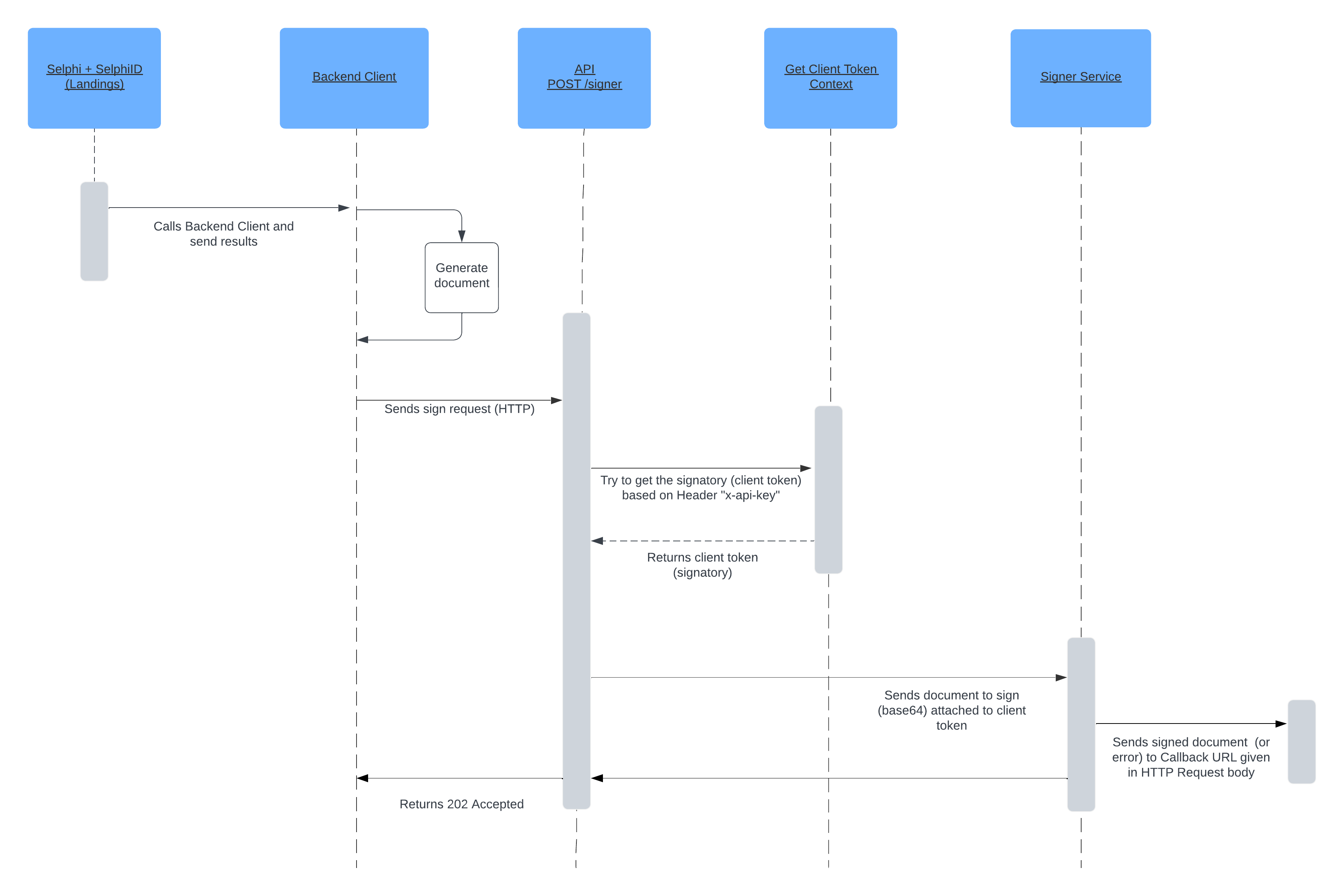
info
Consuming the API from the backend instead of the frontend protects data and avoids exposing sensitive credentials, preventing vulnerabilities and ensuring secure data handling.
Sign
Create signature request:
curl --location '{IDENTITY_API_BASE_URL}/signer' \
--header 'Content-Type: application/json' \
--header 'x-api-key: {API_KEY}' \
--data '{
    "document": "{DOCUMENT}",
    "image": "{IMAGE}",   // Deprecated, use 'images' instead
    "images": ["{IMAGE1}", "{IMAGE2}"],
    "page": "{PAGE}",
    "position": "{POSITION}",
    "timezone": "{TIMEZONE}",
    "signature": "{SIGNATURE}",
    "dateFormat": "{DATE_FORMAT}",
    "callbackUrl": "{CALLBACK_URL}",
    "callbackHeaders": "{CALLBACK_HEADERS}"
}'
Request parameters:
| Field | Required | Description |
|---|---|---|
DOCUMENT | Yes | PDF document to be signed as Base64 |
*IMAGE | No | * Deprecated. Image to be embedded into the document as part of the signature proof. Format: Base64 |
IMAGES | No | An array of images to be embedded into the document as part of the signature proof. Format: Base64 |
PAGE | No | Page on which the signature proof will be placed (zero indexed, default: 0) |
POSITION | No | The image rectangle bottom-left & top-right corner coordinates in pixels corresponding to 72DPI resolution. For an A4 document page, X-Y values ranges from 0-595 and 0-842 pixels respectively. (Example: 300,100,500,150). Default: 135;210;480;300 |
TIMEZONE | No | The timezone identifier to handle dates in the process of sign. (Example: America/Lima) Default: UTC. List available timezones. |
SIGNATURE | No | A free-form text array containing signature details. Each line is included alongside the signature image. It can include placeholders such as $(date)s, which will be dynamically replaced with the current date and time based on the specified timezone and format provided in dateFormat & timezone fields. Example: ["ID - 9999999", "Date - $(date)s"]. Default: ["Digitally signed by Facephi", "RUC:20000000000"] |
DATE_FORMAT | No | The format string for representing dates and times, following the ISO 8601 standard. Additionally, it supports the "%z" specifier for the timezone offset. For example, "%d/%m/%Y %H:%M:%S%z" represents the date in the format "DD/MM/YYYY HH:MM:SS±HHMM". Default: %Y/%m/%d %H:%M:%S%z |
CALLBACK_URL | Yes | URL to send the signed PDF or error message to. No additional configuration from Facephi is required to make it functional. |
CALLBACK_HEADERS | No | Headers to add to the callback URL request (example: key1=value1;key2=value2) |
aviso
Supported image formats are JPEG and PNG
Example response:
202 Accepted
Callback event
When an operation is completed, either successfully or with error, a POST request is sent to the address in
the callbackUrl field. If callbackHeaders field is also reported, they are attached to the request.
On success
Content-Type: multipart/form-data

file=report-2242764658.pdf
On error
Content-Type: application/json

{
    "operationId": "910e181e-305c-4d9b-b42b-f177bf3b06ef",
    "error": "image: unknown format"
}
Response fields:
| Field | Description |
|---|---|
operationId | Internal operation identifier |
error | Error message |